
WooCommerce Inventory Management
WooCommerce Inventory Management
WooCommerce's built-in inventory tools handle the basics for a single-channel store. But if you're also selling on Amazon, eBay, Shopify, Walmart, or other channels, WooCommerce only tracks its own orders. Every sale on another platform leaves your WooCommerce listing quantity stale until someone updates it manually.
Ordoro connects to WooCommerce as one channel in a shared inventory system. When a sale arrives from any connected channel, Ordoro decrements the shared count and writes the updated quantity back to WooCommerce — and every other channel — automatically. See: Inventory Management Software for a full overview of Ordoro's inventory management capabilities.
What WooCommerce's Built-In Inventory Covers
WooCommerce's native inventory is sufficient for straightforward single-channel stores:
- Per-product and per-variation quantity tracking — enable stock management on any product to auto-decrement on sale
- Low-stock and out-of-stock notifications — configure thresholds and stock statuses per product
- Backorder settings — allow or disallow backorders per product
- Stock status display — show available quantities or stock status on the storefront
Where it falls short: WooCommerce doesn't sync inventory across Amazon, eBay, Shopify, or other channels. It has no native purchase order system, no multichannel writeback, and no component-level kitting. For merchants selling across multiple channels or running a warehouse with real fulfillment workflows, these gaps create manual work and eventual oversells.
WooCommerce Native Inventory vs. Ordoro
| Feature | WooCommerce (native) | Ordoro |
|---|---|---|
| Per-product and per-variation tracking | ✓ | ✓ |
| Multichannel inventory sync (Amazon, Shopify, eBay) | No | ✓ single shared pool across all channels |
| Multiple warehouse locations | No | ✓ per-location independent counts |
| Purchase orders with direct supplier emailing | No | ✓ |
| Barcode receiving against POs | No | ✓ |
| Barcode pick/pack verification | No | ✓ catches mispicks before labels print |
| Kitting with component-level tracking | No | ✓ automatic decrements on sale |
| Bill of Materials and Manufacturing Orders | No | ✓ |
| Dropship order routing to suppliers | Manual | ✓ automatic |
| Reorder point automation | No | ✓ draft PO triggered at threshold |
When Do You Need More Than WooCommerce?
WooCommerce's built-in tools are sufficient for straightforward single-channel stores. The need for dedicated inventory management appears at a predictable point.
Stay with WooCommerce alone if:
- You sell exclusively on WooCommerce with no other channels
- You restock from one or two suppliers occasionally and track it manually
- You don't sell kits or bundles that share components with individually listed products
- Your order volume is low enough that manual fulfillment workflows are manageable
Add Ordoro if:
- You sell on Amazon, eBay, Shopify, Walmart, or other channels alongside WooCommerce — and need stock to stay in sync automatically after every sale on every channel
- You need purchase orders with direct supplier emailing and barcode receiving against the PO
- You sell bundles where the same components are also sold individually — Ordoro decrements the right quantities from each component automatically when a kit sells
- Part of your catalog dropships directly from suppliers — Ordoro routes those orders to the correct supplier automatically
- You fulfill from multiple warehouses and need per-location inventory tracking with controlled channel writeback
- You want barcode pick/pack verification before labels print, without a separate WMS system
How Ordoro Connects to WooCommerce
Ordoro integrates with WooCommerce via REST API. Once connected:
- Orders import automatically from WooCommerce into your Ordoro fulfillment queue alongside orders from your other channels
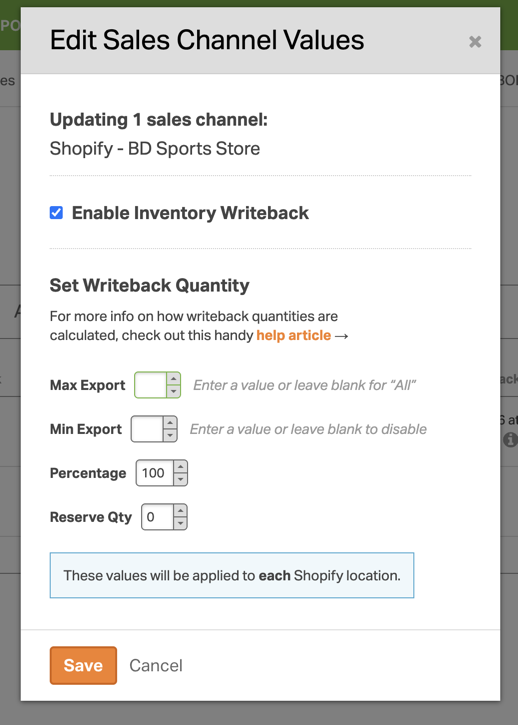
- Inventory writes back to WooCommerce on a configurable schedule — every 10 minutes, hourly, every 6 hours, or daily
- Tracking numbers post back to WooCommerce when you ship an order from Ordoro, triggering WooCommerce's fulfillment notification to the customer
Ordoro commits inventory immediately when a WooCommerce order arrives — before the writeback cycle runs — so the same units can't be sold on WooCommerce and another channel simultaneously. See: How to enable inventory writeback to sales channels | Auto-sync inventory across sales channels | Watch: How Inventory Sync Works in Ordoro
Selling on WooCommerce? Try Ordoro today.
Ordoro is a 4.9-star-rated inventory management platform built for WooCommerce merchants — multichannel sync, purchase orders, kitting, barcode warehouse workflows, and fulfillment in one dashboard. 15-day free trial. No credit card required.
Multichannel Inventory Including WooCommerce
If you sell on Amazon, Shopify, BigCommerce, eBay, Walmart, Etsy, or other channels alongside WooCommerce, Ordoro manages all of them from one inventory pool.
Ordoro tracks three states per SKU:
- Physical On Hand (POH) — units physically in your warehouse
- Committed (CMT) — allocated to open orders not yet shipped
- Available On Hand (AOH) — what's available for new sales (POH minus CMT)
The quantity Ordoro writes back to WooCommerce (and every other channel) is AOH — not raw physical stock. When an order arrives, inventory commits immediately, so the same units can't sell twice between sync cycles.

Multi-Warehouse Inventory Tracking
If your stock is split across warehouses, a 3PL, or multiple fulfillment locations, Ordoro tracks inventory at each location independently. When an order ships from a specific warehouse, inventory decrements from that location only.
You control which warehouse's stock feeds WooCommerce. A warehouse holding reserve or wholesale stock can be excluded from your WooCommerce listing quantity. See: How do I transfer inventory between warehouses?
My Girlfriend's Quilt Shoppe: WooCommerce + Shopify + Ordoro
My Girlfriend's Quilt Shoppe sells fabrics, notions, patterns, and quilting machines through two physical storefronts in Utah and online via WooCommerce and Shopify. With 8,000+ SKUs, 9,000 orders per month, and 100 suppliers, they had outgrown ShipStation, Hike, and QuickBooks Online combined. Ordoro replaced all three — shipping, inventory management, purchasing, kitting, and Bill of Materials under one roof. Inventory now syncs across WooCommerce and Shopify from a single source of record.
*"It's great to have all these workflows — shipping, inventory management, purchasing, manufacturing — all under one roof."* — My Girlfriend's Quilt Shoppe
Read the full case study: My Girlfriend's Quilt Shoppe and Ordoro

Kitting and Bundle Inventory for WooCommerce
If you sell product bundles on WooCommerce alongside individual components listed separately, Ordoro tracks availability at the component level. Define a kit by specifying which SKUs it contains and in what quantities. Kit availability is calculated from live component inventory. When a bundle sells on WooCommerce, component quantities decrement automatically — and kit availability updates across all connected channels. See: How kitting works in Ordoro | Watch: How to Set Up Kits in Ordoro

Purchase Orders and Inventory Replenishment
WooCommerce has no native purchase order system. Ordoro adds a full PO workflow:
- Identify low-stock SKUs using inventory reports and per-SKU reorder thresholds
- Create a PO against a specific supplier, with quantities, costs, and expected delivery
- Send the PO to your supplier by email directly from Ordoro
- Receive inventory against the open PO when stock arrives — quantities update automatically
- Partially receive if a supplier ships in batches — Ordoro tracks outstanding quantities until the PO closes
See: How to receive items from a PO | Purchase Order Management Software

Order Fulfillment and Shipping
WooCommerce orders appear in the same Ordoro fulfillment queue as orders from your other channels. Your team works from one screen regardless of channel origin.
- Batch label printing — print labels for dozens or hundreds of orders at once
- Automation rules — assign shipping methods, route to warehouses, and tag orders automatically on import
- Discounted carrier rates — USPS (up to 67% off retail), FedEx, UPS, and Canada Post
- Tracking pushback — tracking posts to WooCommerce automatically on shipment
Watch: How to Create Bulk Shipping Labels in Ordoro
Customer Support
Ordoro is run by a small, dedicated team. When you have a question, you reach a real person — by phone, email, or screen share — not a support bot or ticketing queue. Phone support runs Monday through Friday, 8:30 AM to 5:00 PM CST.
Every new account gets five weekly onboarding calls with a dedicated specialist to configure your channels, warehouses, suppliers, and workflows from the start.
Frequently Asked Questions
Does WooCommerce have inventory management?
Yes. WooCommerce includes per-product quantity tracking, low-stock notifications, out-of-stock alerts, and backorder settings on all plans. For single-channel stores with straightforward fulfillment, it's often sufficient. For merchants selling across multiple channels, running a warehouse, or needing purchase orders and kitting — Ordoro adds the operational layer WooCommerce doesn't provide natively.
Does Ordoro integrate with WooCommerce?
Yes. Ordoro connects to WooCommerce via REST API. Orders import automatically, inventory writes back on a configurable schedule, and tracking posts back to WooCommerce when orders ship.
How does Ordoro prevent overselling on WooCommerce?
Ordoro maintains a single shared inventory count per SKU across all connected channels. When a sale arrives on WooCommerce, Ordoro commits that inventory immediately — before the writeback to other channels runs. The Available On Hand quantity (physical stock minus committed orders) is what gets written back to WooCommerce, preventing the same units from selling on two channels within the window between syncs.
Can Ordoro sync WooCommerce inventory with Amazon or Shopify?
Yes. Connect WooCommerce, Amazon, and Shopify to Ordoro. When a sale comes in on any channel, Ordoro decrements the shared inventory count and writes the updated quantity to all connected platforms automatically.
Does Ordoro work with WooCommerce and multiple warehouses?
Yes. Each physical location is configured as a separate warehouse in Ordoro. When a WooCommerce order ships from a specific location, inventory decrements from that warehouse only. You control which warehouse's stock feeds your WooCommerce store.
How does Ordoro handle kits and bundles on WooCommerce?
Define kits in Ordoro by listing the component SKUs and quantities per kit. Kit availability is calculated from live component inventory. When a bundle sells on WooCommerce, component quantities decrement automatically — and kit availability across all connected channels updates on the next sync.
Does WooCommerce have purchase orders?
No. WooCommerce has no native purchase order system. Ordoro adds a full PO workflow — create, email to supplier, barcode-receive against the PO, auto-update inventory — within the same platform used for orders and shipping.
Does WooCommerce have barcode scanning?
No. WooCommerce has no native barcode scanning for receiving inventory or verifying picks before shipment. Ordoro adds barcode scanning for three workflows without requiring a separate system: scan to receive inventory against an open purchase order, scan each item in an order before the label prints to catch mispicks, and scan during stocktakes to count without manual entry. See: Inventory App with Barcode Scanner
What is the best WooCommerce inventory management plugin?
For WooCommerce merchants who need multichannel inventory sync across Amazon, eBay, Shopify, and other channels — alongside purchase orders, kitting, barcode warehouse workflows, and shipping — Ordoro is a highly rated option. It connects to WooCommerce via REST API and handles the full inventory and fulfillment layer that WooCommerce's native tools don't cover. See: Inventory Management Software for a broader comparison of ecommerce inventory management platforms.
Can I use Ordoro for WooCommerce inventory without using it for shipping?
Yes. Ordoro's inventory management features — multichannel sync, purchase orders, kitting, barcode receiving, stocktakes — work independently of whether you use Ordoro for shipping labels. If you already use WooCommerce Shipping, ShipStation, or another shipping tool, Ordoro manages the inventory layer alongside it without requiring you to change your shipping workflow.
How does Ordoro handle returns for WooCommerce orders?
When a customer returns an item, you add the quantity back to Physical On Hand through a manual inventory adjustment in Ordoro — logged with a timestamp, reason code, and user. For businesses with higher return volume, returned stock can be received into a dedicated returns location in Ordoro and moved to main inventory only after inspection and confirmation.
Don’t take our word for it…
Thousands of ecommerce sellers trust us to help them scale.


“The real standout is the customer support! They’re friendly, knowledgeable, responsive, and invested in helping us make the most of Ordoro. ”
Sean M.